Custom Code
JustCall Campaigner
A desktop app for running bulk SMS and MMS campaigns through JustCall. It personalizes every message, paces sends to stay inside API rate limits, and posts a Slack recap.
Overview
JustCall Campaigner is a Windows desktop app that a land and minerals team uses to run bulk SMS and MMS campaigns through JustCall. It reads a list of contacts from a CSV file or a Google Sheet, personalizes each message from a template, paces the sends so they stay inside JustCall's rate limits, and writes a per-recipient result back out. After a campaign it can re-check what actually delivered and post a formatted recap to Slack.
The goal was to let one person send hundreds of personalized texts in a few clicks, safely, instead of pasting numbers and messages one at a time.
The Problem
The team reaches out to mineral owners in batches: the same message, personalized with a first name, an account manager, and a county, sent to hundreds of people at once. Doing that by hand in a texting app is slow and error prone, and it is easy to trip the provider's rate limits or accidentally message a non-US number. They needed a tool that took a spreadsheet in and handled the rest: personalization, pacing, filtering, delivery checks, and a record of what happened.
How It Works
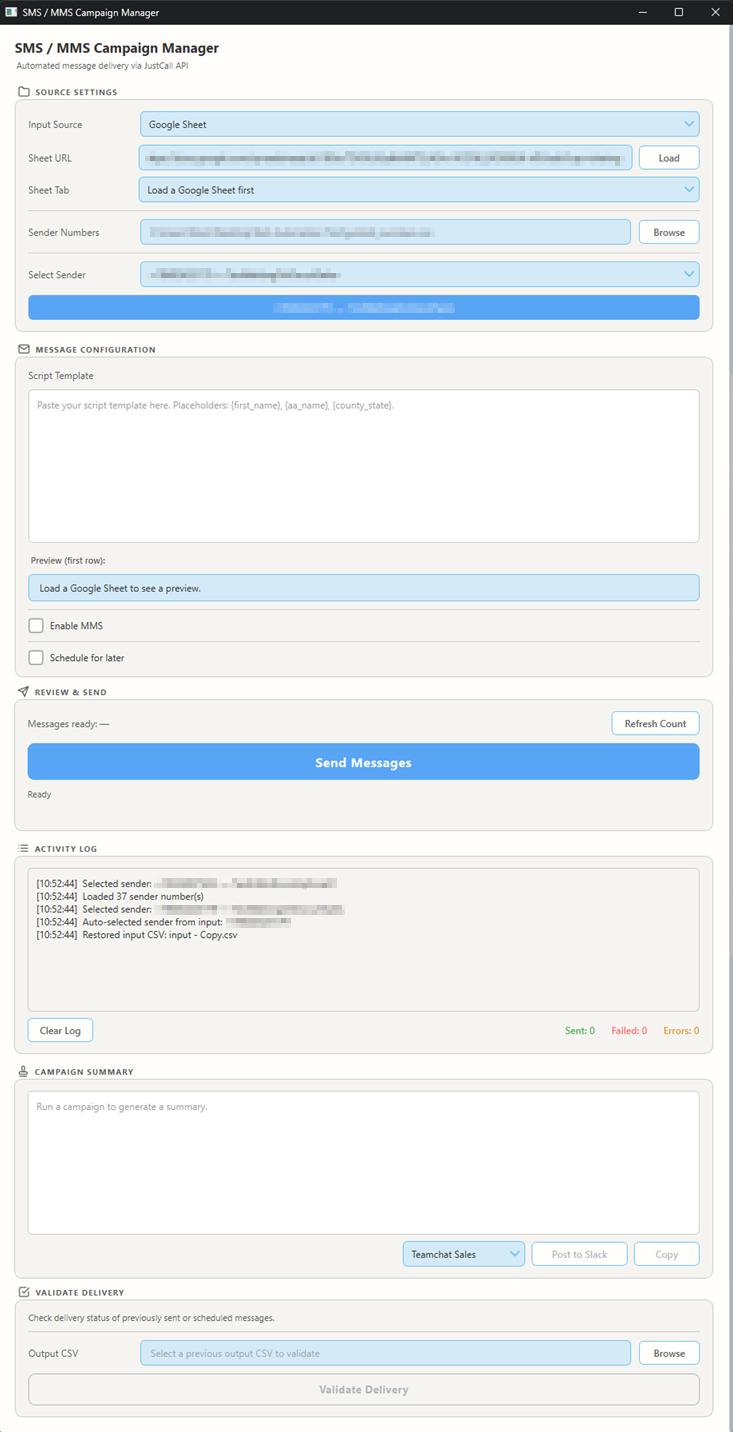
The app is a three-step workflow in a single window.
Step 1, load the list. Point the app at a local CSV or paste a Google Sheet
URL. The required columns are a phone number and a script; optional columns feed
personalization placeholders like {first_name}, {aa_name}, and
{county_state}. A separate senders file lists the JustCall numbers to send
from, so the user can pick which number a batch goes out on.
Step 2, write and preview. The user writes the message template once. A live counter shows the longest message's length, its SMS segment count, and whether it encodes as plain GSM or costlier Unicode, turning red past a 3.5-segment ceiling. Smart punctuation like curly quotes and ellipses is auto-converted to plain ASCII in the template, so a single stray character does not double the cost of every message. Image URLs can be attached per row for MMS.
Step 3, send. Before anything goes out, a confirmation dialog previews the batch and flags non-US numbers (which are skipped) and any messages over the segment ceiling. During the send the app reads JustCall's rate-limit headers and throttles itself automatically, retrying when the API pushes back, and the whole run can be cancelled cleanly mid-flight. Campaigns can also be scheduled for a later date and time, queued on the server so the app does not have to stay open.
Every run writes a timestamped output CSV recording each recipient's status and any error. When the source is a Google Sheet, those results are appended back into the original rows. A separate delivery-validation step re-queries JustCall for an older run to confirm which messages actually delivered, queued, or failed.
Slack recap and routing. After a campaign the app builds a summary with the channel mention, the volume sent, the sending number, and the script, ready to copy or post to one or more Slack channels. Each sender number can be mapped to the channels it should report to, so the right team sees the right recap automatically.

The tool also connects to Pipedrive CRM to pull deal IDs, tying each text back to the deal it belongs to for the team's pooling-order workflow.
Tech Stack
- Python for the desktop UI, sending on background threads so the interface stays responsive during a campaign.
- JustCall API for SMS and MMS delivery, with adaptive rate limiting driven by the API's own rate-limit headers.
- Pipedrive CRM for deal data and Google Sheets for list input and result write-back.
- Cloudinary for hosting the images sent as MMS.
- Slack Incoming Webhooks for the per-campaign recaps.
- Packaged as a standalone Windows executable with an installer, so non-technical staff run it without installing Python.