Custom Code
Pooling Order Automation
A desktop app, fronted by Claude, that turns a scanned oil-and-gas pooling-order into a per-owner ownership spreadsheet, splitting owners and deriving the royalty math.
Overview
Pooling Order Automation reshapes an oil-and-gas pooling-order document into the spreadsheet a land and minerals team actually works from. The original document arrives as a scanned image PDF, so the first stage uses Claude to read it into a structured "Exhibit A" workbook: one row per lease, where a single lease can name several owners in one cell. From there a Windows desktop app does the reshaping, turning that into the opposite shape: one row per owner, with the name split into first, middle, and last, and the ownership and royalty math worked out for each one.
Along the way the app fills in what it can from a local lease-matching database: each owner's mailing address, the state, and the lease royalty rate. Columns that still need a human, like the legal description and QA notes, are created and left blank for an analyst to complete.
The Problem
Every pooling order used to be handled by hand from the start. The source is a scanned image PDF, so an analyst first read it and typed the leases into a spreadsheet. Then, for each lease, they read the owner cell, split "SMITH, JOHN A AND MARY B" into separate people, decided whether a name was actually a company, a trust, or a government body, and typed each owner onto its own row. After that came the lookups: find each lease in the reference database, copy across the mailing address, the state, and the royalty rate, then compute each owner's share of the unit and their net revenue interest.
It is slow, repetitive work across hundreds of rows, and every manual split and lookup is a chance to mistype an address, miscount a share, or quietly drop an owner. The team wanted the mechanical parts to happen on their own, with a person left to review the result and fill in the columns that genuinely need judgment.
How It Works
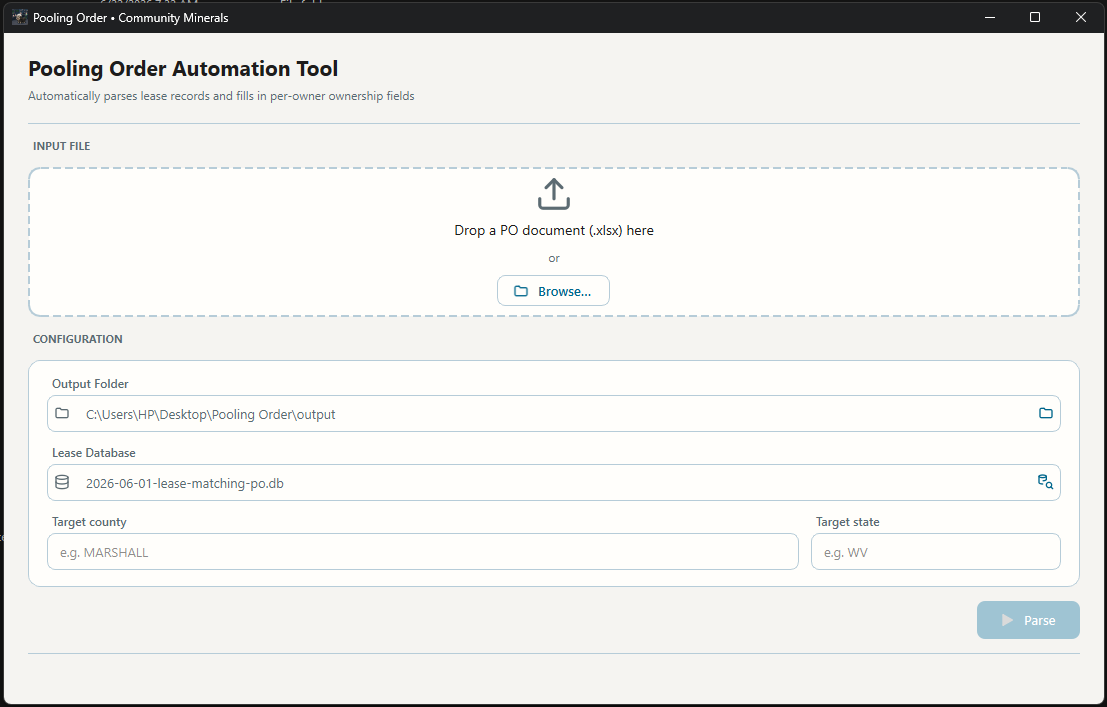
The workflow has two stages: first Claude turns the scanned document into a workbook, then the desktop app reshapes it. The app itself is a single window built around one action: point it at an Exhibit A file and parse.
Read the document. The pooling order arrives as a scanned image PDF. Claude reads it and returns a structured Exhibit A workbook, one row per lease, so the messy scan becomes clean tabular data the app can work with.
Load the workbook. Drag an Exhibit A .xlsx onto the drop zone or browse to
it. The parser finds the header row on its own by looking for the owner column, so
it does not matter if the sheet has title rows above the table. It also accepts
the many different ways teams label the same columns, matching on meaning rather
than exact text.
Set the target. Below the file are the run's settings: where to save the output, which lease database to match against, and the target county and state. The county and state are written onto every output row, so a batch is always tagged with the unit it belongs to.
Parse. In one pass the app does the reshaping and the lookups together. For each lease it splits the owner cell into individual people, recognizing that companies, governments, churches, and trusts are not people and should not be split, then strips the marital and legal descriptors, aliases, and suffixes that clutter these documents. Each owner becomes its own row. A lease it cannot make sense of still emits one row rather than vanishing, so nothing is ever silently dropped.
Enrich and calculate. Each lease is matched against the lease database by its recording information to pull in the mailing address, state, and royalty rate. From the acreage the app works out each owner's share of the unit and their net revenue interest. Leases with no match keep those columns blank instead of inventing a number.
Open the result. The output is a formatted workbook laid out to match the team's reference file, saved to the chosen folder and ready to open and review.
The Desktop App
The same parser runs from the command line, but the team uses the desktop app so no one has to touch a terminal. On first launch it sets up a "Pooling Order" folder on the Desktop with input and output subfolders and a starter copy of the lease database, and uses that as its home from then on. Dropping a newer dated database into the folder replaces the old one automatically, so keeping the matching data current is a simple file copy rather than a rebuild. It is packaged as a standalone Windows executable with an installer, so installing it is a normal double-click.
Tech Stack
- Claude reads the scanned pooling-order PDF and returns a structured Exhibit A workbook, turning an image into clean tabular data before any code runs.
- Python as the core, structured as a small pipeline of single-purpose steps: read the workbook, parse and classify names, look up and enrich, then derive the math and write the output. Each step is pure and independently tested.
- openpyxl for reading the Exhibit A workbooks and writing the formatted, team-styled output workbook.
- SQLite as a read-only lease-matching database of roughly 476,000 records, queried in batches to enrich each lease with address and royalty data.
- A Windows desktop app over the same parser, with the parse running on a background thread so the window stays responsive on large workbooks.
- Packaged as a standalone Windows executable with an installer, bundling the starter database so a non-technical user can run it out of the box.